Bitboard Basics
I assume you have some coding knowledge, otherwise try to follow along :D
1. What are they?
Binary is represented as 0 or 1 which computers can understand as being on or off. Transistors (gates that can either let current through or not) are the simplest form of what makes up a computer and allows them to make complex dedicated objects such as for processing math (the ALU). When searching about this, I found Digital Logic Sim by Sebastian Lague which fascinated me for some time. It allows you to play around with these fundamentals to create things like a clock, or a binary number adder through turning on and off lights / switches (currents).
Representing base-10 numbers → binary is straightforward. Firstly, know that binary is always in the form by the power of 2. Depending on the number, you count from right to left, ticking one bit on or off, and carrying a bit when you are switching from 1.
To find what 3 is in binary, we calculate how many bits it needs (2), then count up from zero. Remember we only use 1 and 0. Here is a simple cheat sheet from numbers 0 to 15:
0000→ 00001→ 10010→ 20011→ 30100→ 40101→ 50110→ 60111→ 71000→ 81001→ 91010→ 101011→ 111100→ 121101→ 131110→ 141111→ 15
In the language C, we have main bitwise operations we can apply when working with binary numbers
&= AND - Result bit is1if operand bits are both1|= OR - Result bit is1if one operand bit is1^= XOR - Result bit is1if both operand bits are different~= NOT - Result is inverted<<= LSHIFT - Result is shifted left by an amount, filling with zeros>>= RSHIFT - Result is shifted right by an amount, filling with zeros
Here are a few examples:
| Operation | Example | Result |
|---|---|---|
| AND (&) | 1010 1100 |
1000 |
| OR (|) | 1010 1100 |
1110 |
| XOR (^) | 1010 1100 |
0110 |
| NOT (~) | 1010 | 0101 |
| LEFT SHIFT (<<1) | 1010 | 0100 |
| RIGHT SHIFT (>>1) | 1010 | 0101 |
2. Utilisation
Bitwise operations are extremely fast and we can manipulate numbers them however we want. An example of this is storing move data.
As we are working with binary numbers, we can apply different techniques such as OR, AND, XOR, etc.. to get desired outputs and be extremely efficient for move generation (explained more later on). For instance, take my encoding for a move. We need 24 bits to represent it:
0 0 0 0 0000 0000 000000 111111: From (square) (uses 6 bits as the maximum square number is 63)0 0 0 0 0000 0000 111111 000000: To (square) (where the piece wants to move to)0 0 0 0 0000 1111 000000 000000: Piece Type (uses 4 bits as there are 12 piece types which include their colour)0 0 0 0 1111 0000 000000 000000: Promotion Piece (4 piece types to promote with & 2 different colours = 4 bits needed)0 0 0 1 0000 0000 000000 000000: Capture (is move a capture? 1 bit needed)0 0 1 0 0000 0000 000000 000000: Double Push (for pawns which have not moved yet, 1 bit needed)0 1 0 0 0000 0000 000000 000000: En Passant (special rule for pawns capturing after opponent does double push)1 0 0 0 0000 0000 000000 000000: Castling (are we castling? 1 bit needed)
Our encoding needs 32 bits in total, and to decode we could use an AND operator along with the move data to get the specified data we want. For example, move & 0x3f would get the bits for the FROM square out of the stored 32-Bit integer.
With 1-64 squares on a chess board, each square can be represented as a '1' in the place where the square would be, but within a string of numbers, so each square occupies one bit in a single binary number with 64 zeros! To put this into perspective, the number 18446744073709551615 would equate to all 64 bits turned into 1s! We bitwise shift left using << to set the square bit value.
For example, this could represent E4 square:
| 0 | 0 | 0 | 0 | 0 | 0 | 0 | 0 |
| 0 | 0 | 0 | 0 | 0 | 0 | 0 | 0 |
| 0 | 0 | 0 | 0 | 0 | 0 | 0 | 0 |
| 0 | 0 | 0 | 0 | 1 | 0 | 0 | 0 |
| 0 | 0 | 0 | 0 | 0 | 0 | 0 | 0 |
| 0 | 0 | 0 | 0 | 0 | 0 | 0 | 0 |
| 0 | 0 | 0 | 0 | 0 | 0 | 0 | 0 |
| 0 | 0 | 0 | 0 | 0 | 0 | 0 | 0 |
All we need to do is string the numbers into one line and there you have it, a bitboard!
I found this website called Bitboard Viewer which makes it more visually appealing. It helped me with outputting ranks and files and other bitboard related stuff.
From this, I used a 64-bit number to represent A1-H8 on the chess board, then another array which contains the bit square value (1ULL << SQUARE) for easier conversion from square → bitboard square.
We can apply this rule for other chess data such as castling, needing only 4 bits:
0001→ White Kingside0010→ White Queenside0011→ White Kingside + Queenside0100→ Black Kingside1000→ Black Queenside1100→ Black Kingside + Queenside1111→ Both sides have all castling rights
For other bitboards, I made separate binary numbers (uint64_t, aka unsigned long long in C, see a list of fixed integer types which I used to keep size and memory smaller) for every piece to track where they are on the board. This can be done by finding the least significant bit (LSB(bitboard)) and a loop if we have more than 1 bit placed on the bitboard. In C, __builtin_ctzll(bitboard) does this well (on Windows at least). We can update the square they are on by using XOR to remove piece from square, and OR to place piece on new square: bitboard &= ~(1ULL << square). The same is applied to attack tables (like knight attacks which are precomputed for speed) to generate moves.
Magic Bitboards
Magic Bitboards are unfortunately not magic. The name is most likely derived from their surprising speed gain and complex methods. Thus, it is easier to describe them as working like ✨ magic ✨.
1. What are Magic Bitboards?
Magic Bitboards are used to generate moves where blockers cannot simply be piecePseudoMoves & ~ourPieces (assumes all moves apart from moving into our own pieces is legal) because of sliding pieces, which are bishops, rooks, and queens. Using the default method, our final result would include squares being available behind the piece, but we want to discard that and stop the ray when we meet our first blocker in that direction.
Still following? Here is an example to make it easier to visualize. Assume the position:
(Thank you to the chess board image generator for making this possible).
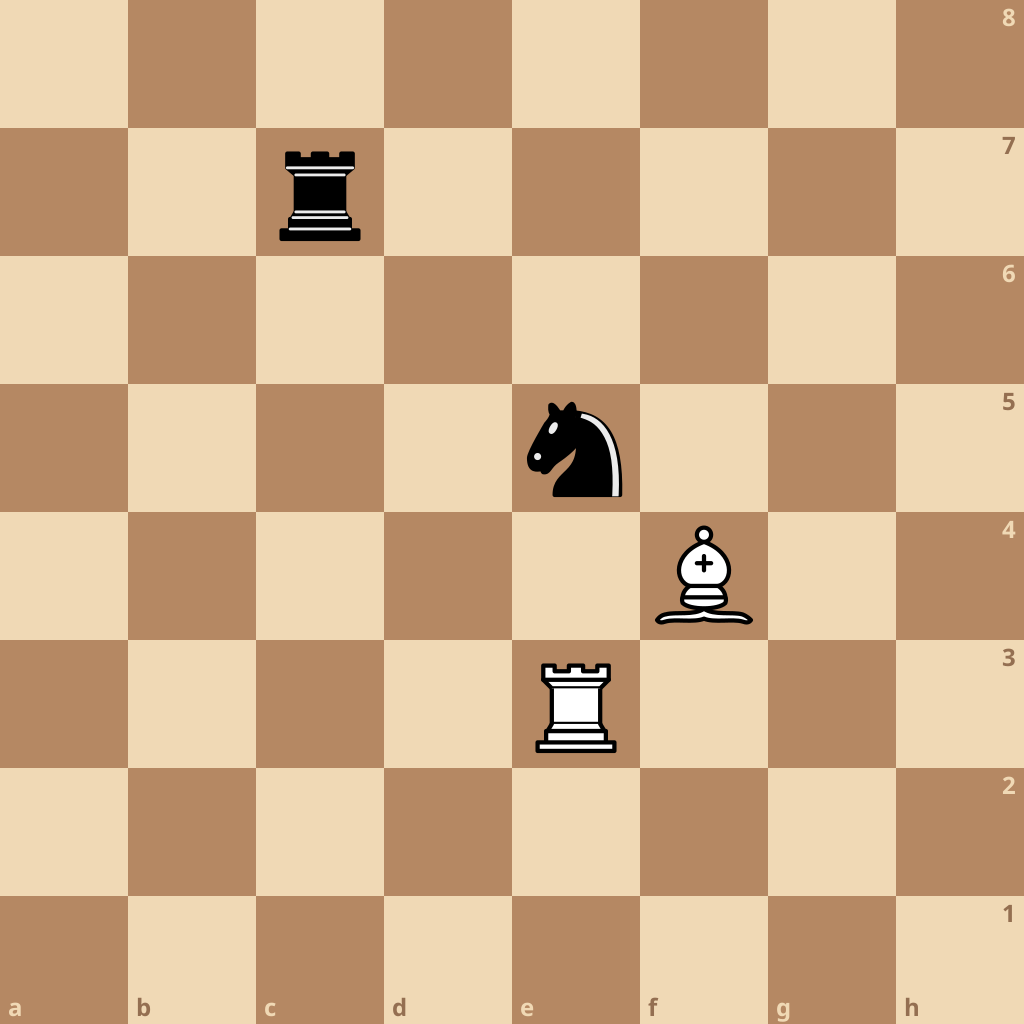
Our goal is to calculate the legal moves of our bishop.
Using piecePseudoMoves & ~ourPieces would result in the moves in green being classed as legal:
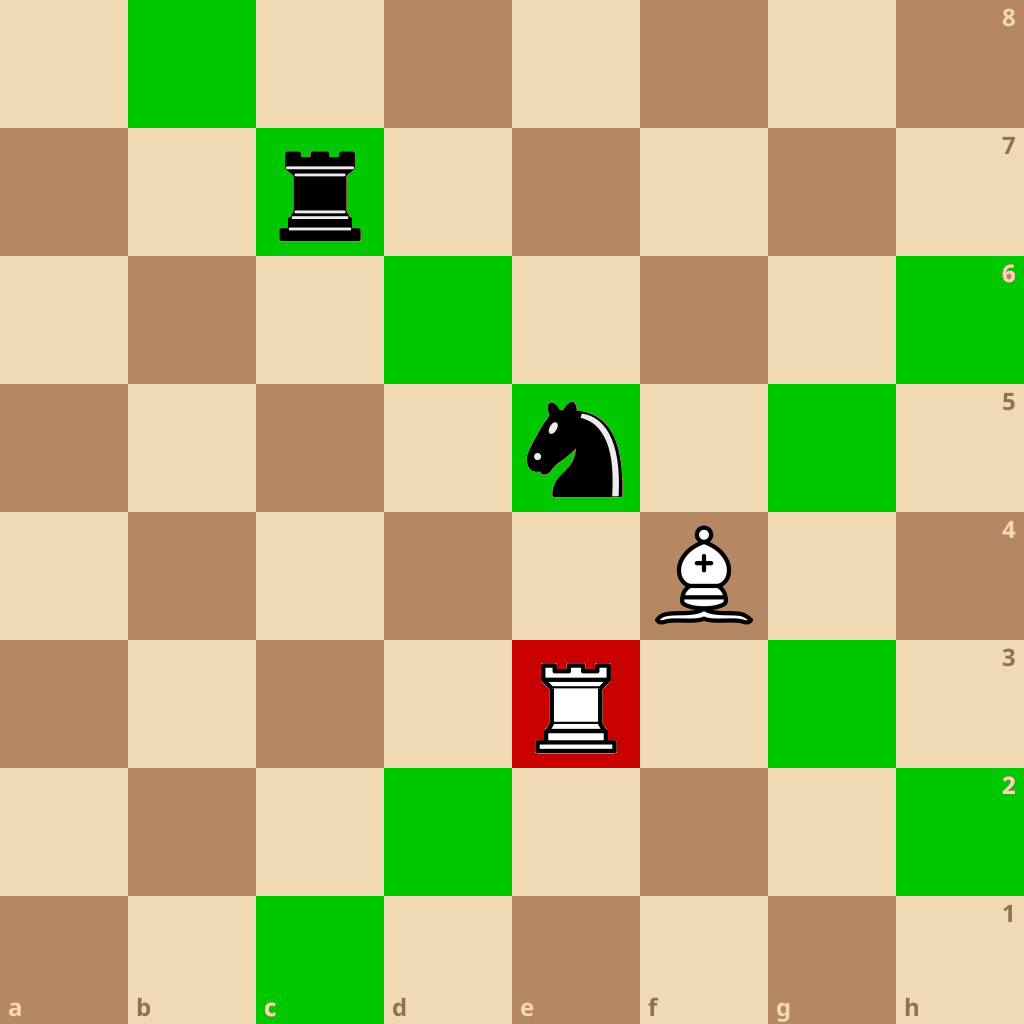
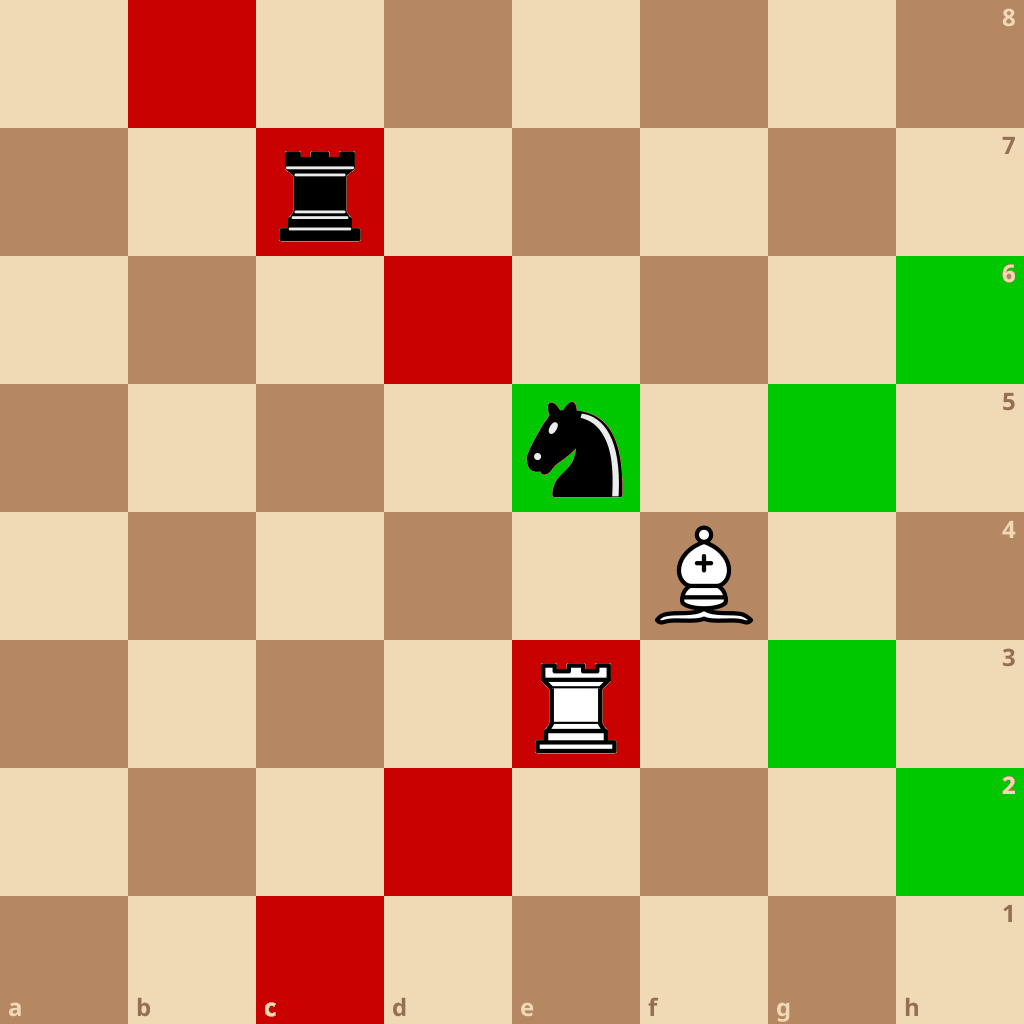
See the issue? Our "legal" moves are not actually legal, they pass through our opponents pieces. Using a loop through a ray direction until a blocker is hit is slow, so we use Magic Bitboards as we all have a ≡NEED FOR SPEED when crafting Chess Engines. Despite having the strong urge to give up, I managed to get Magic Bitboards to work, vowing to not touch it from then on (if it works and its complicated, don't touch it :D).
I have annotated this so green = legal moves, red = illegal move.
2. How do they work?
I had a nightmare with attempting to find out how they work. I guess this is why they are called magic after all!
So, Magic Bitboards have indexes, much like normal bitboards, but each index contains a random-looking 64 bit number, but in fact it is not that random.
I do not want to spend ages on this topic as it is still complex to explain everything, so I will try summarise it.
When we have our bitboard rays from the square and piece of choice, we multiply it with a "magic number" to get an index, then shift it by 64-n bits and look up its value in a precomputed table to obtain the correlated and correct legal moves it can make.
Before all that, you would of had to fill the table with possible combinations of blockers and legal moves from each square of that sliding piece. Doing this with all squares is too much, which is why magic bitboards came into place.